· Menlo Park, CA
Agent Glass
Built out of frustration after losing a Claude session mid-flow. Agent Glass is a local browser for your AI agent history — useful for recall, and occasionally for catching your AI phoning it in.
I built Agent Glass.
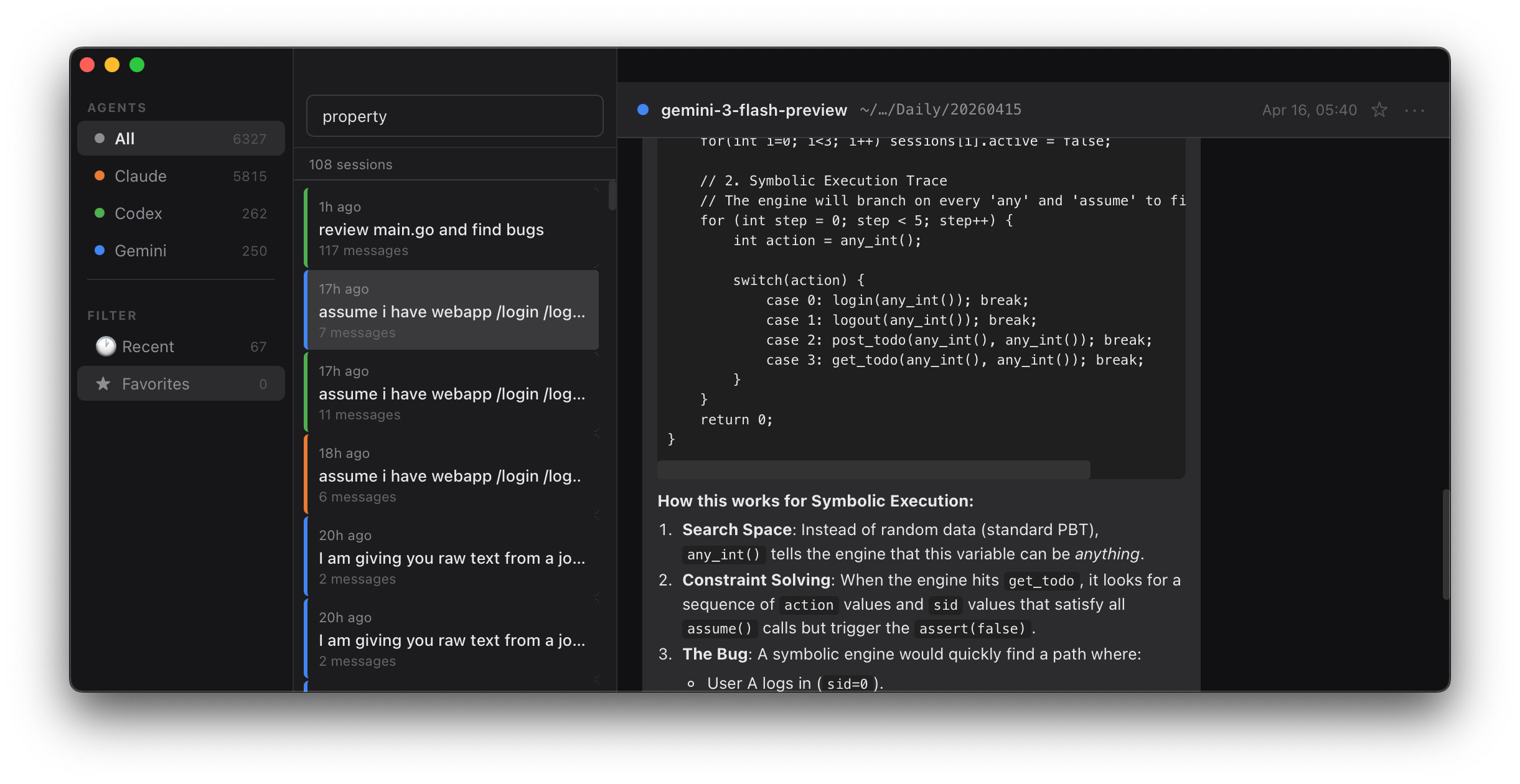
Beautiful, isn’t it? This baby has three panes: Sidebar with all the stuff you need right away. Click around, don’t be scared. The list of stuff you’re supposed to be looking at is the middle pane: think of it as an index of everything that you went through with AI agents. All your conversations will be listed here. Most of your eye’s time will be on the main pane, which is the content. This is where the transcript of all your AI divagations live.
Now listen: this thing was made in a painful moment. I just had the most beautiful conversation with AI. It praised me. It complimented. It agreed. Then I lost power to my laptop and I couldn’t quite find an easy way to come back to that day’s session.
There is this tension in every maker: whether to get things done fast and forget, because you just cannot take care of everything, or slow down and solve things in a beautiful way.
This experience was not an isolated case, and since I’m bootstrapping a company, I can’t afford to have mistakes happen more than once. The moment shit hits the fan, I fix it. AI is supposed to make it work like that, isn’t it?
Alright, there are three categories of projects that I do on a day-to-day basis, all with AI assistants, and the last one made Agent Glass be a good time investment. But first things first.
The first category is: don’t cares. Silly tools, automation and things for activities I would hate had there not been an AI. Things like scraping lists of contacts or putting phone numbers in the Excel spreadsheet. I often do it once and forget about it. I don’t even bother saving this script because even if I do I won’t remember where I put it. Most of the time I don’t want to look at it anyway even if I know where it is. This category frankly has a lot of toys, as well as some of the hobby projects that I am a recipient of.
Then there is a medium category.
The medium category I’m calling cares. I want to show these to friends and family, and if something doesn’t work I’ll be embarrassed. If your in-laws get a cute puppy called Cujo, and you want to make a feeding and bathing and training calendar. This is the type of a project that you want to spin an AI agent for and do it in five minutes. It won’t be critical. It may break, but this still makes you look silly. For this reason, over the last year or so, I developed a small army of helpers that prevent me from making silly mistakes. I can spin medium category things fast and it works 99.9% of time.
Then there is a third category. It’s called: must-works. The must-work might be a demo of your regulated data platform. Because certain pieces: compute, storage and logic and UI. It must work when you demo it to the customer. Otherwise your customer loses trust and won’t buy.
Those have complex logic, and complex code paths, many code lines and a UI. And perhaps some dire consequences if they don’t work.
Large piece of what I do are the must-works. Even for something like gazesite.com Where I take people’s money for a website review, I want to ensure that the customer service is good and the product is delivered on time.
For this type of stuff I review everything. Especially pieces of code that will go into the backend exposed to everyone. But also spend a lot of time discussing ideas with the agents. My priority list is dictated mostly by the research I do with the tool. Very often I will ask all three agents the same question, and compare what I got.
I’ve been doing it so much recently, that my intuition said: AI is here to stay and you will be working with agents for a long time. You may as well build a good review mechanism so that whichever agent you use day-to-day, you can reflect back on what it told you.
Agent Glass becomes your recall database. It’s a browser for AI agent sessions: they leave valuable files on your disk. Your disk ends up with a backup of your conversations with AI, so whenever you want to recall a conversation — or continue working on a problem in the same window and discussion — the tool makes that possible. This includes situations where your computer crashes: you can still come back to prior working sessions.
Agent Glass doesn’t steal your data and never really interacts with your system except showing you what you’ve already told AI. It just takes advantage of those conversation files and lets you visualize your discussions. The cool thing about building software with AI is that most of your interactions with agents get recorded exactly this way, and Agent Glass looks deep inside of sections. For example, I never can quite tell which answer comes from which strand of the algorithm. So, you see the big AI companies use an adaptive technique where they try to figure out if your question is really hard and if it’s not that they will route it to the algorithm that is less expensive for them to run.
Agent Glass allows you to recall all the sessions you’ve had with Claude, Gemini and Codex. Upon starting, the installer will ask you for access to your AI session history. This is because we need to have access to a couple of directories: ~/.codex, ~/.claude, ~/.gemini.
The access is read only and if granted will be used to actually show you all the sessions in the UI. UI gives you an understanding of how many sessions you’ve had with which agent and what were they all about. Not only is it useful to reflect back on your sessions, but it also acts as a great backup in situations where agents don’t do what I expect them to.
Case from today:
As I’m working on stress testing Konobase platform, I asked all three of the agents for suggestions on how to generate the most malicious, the most stressful, the most bursty traffic. I’m trying to imitate the hoard of very active. Internet users hitting my platform. Upon short discussion with Claude, satisfied with an answer, I came up with a proper formulation of the question that I wanted to ask. And then the final conclusion was:
“Ok, write me the answer to a opus.md”
I asked two other agents to drop their replies to respective files: gpt5.md and gemini.md
Such exploration is a common thing that I do, especially when I do things that I care about. For this session I dived into the topic of fuzzing and randomized tests, and formulating the question and getting reply was valuable.
I quit all three agents and to my amazement only opus.md was there. Frustrating. But it took just a second to find what I wanted. I copied the content of the files from Agent Glass back to the files that I wanted. 10 minutes and scarce intelligence tokens saved.
There is one more fun fact here.
It might be the random case of agent misbehaving or misrouting of my question to an algorithm of a weaker strength.
This is the thing that I would not have been able to diagnose had I not had Agent Glass.
To see exactly what I’m talking about, scroll up back to the screenshot: weak
algorithm gemini3-flash-preview isn’t something that I would expect coding agent to pick for an important task.
I’m excited about the opportunities here, and while I attempt to use AI whenever possible, I hope I won’t be spending too much time verifying things with Agent Glass.